Skip to content

Builder Guide

Your team, your challenge, Friday's rooms, the build weekend and how to submit.

6–8 November 2026 · Turku, Finland · Updated 4 Nov 2026

First up

First

Registration opens

Fri 6 Nov · 15:00EduCity

Add weekend scheduleOpening, workshops, deadlines and finals — all in one place.
  • Apple Calendar

    Subscribe in Apple Calendar

    iPhone, iPad and Mac. Stays up to date.

  • Google Calendar

    On a computer: Other calendars + → From URL, paste the link below. Or download the file and use Settings → Import & export.

  • Outlook

    Open the downloaded file in Outlook — or in Outlook on the web, Add calendar → Subscribe from web and paste the link below.

  • Other calendars

    Any app that opens .ics files.

Calendar link

https://sinceai.ai/hackathon-2026/guide/calendar/builders

Subscribing keeps the schedule up to date if it changes — your calendar app checks for changes itself, and Google can take a day. A downloaded file is a fixed copy.

Challenge summaries
Thu 15:00In sinceai.app · choose from these
Registration
Fri 15:00EduCity · every member in person
Ready · select
Fri 15:00–17:30Team lead · final · places limited
Build spaces
BioCity + JokiFrom Fri 19:30, around the clock
Submission deadline
Sun 10:00In sinceai.app · fixed
Finals
Sun 14:00Five teams, five challenges · ends around 15:30

Optional · AI resources

Using CSC / LUMI computing? Register by Fri 30 Oct — instructions are in your Since AI email.

// your weekend in eight moves

Eight moves, check-in to the vote.

  1. Read

    Thu 15:00

    Challenge summaries in sinceai.app — agree on at least three.

  2. Check in

    Fri 15:00

    EduCity — every member, in person. Then Team Check.

  3. Ready · select

    15:00–17:30

    Team lead marks the team ready, then selects one company challenge — final.

  4. MLH · opening

    16:45 · 17:00

    MLH intro, then the opening and Jason Mayes at Taidon portaat; from 18:30 follow your route.

  5. Briefing

    18:50–19:30

    Your company's room at EduCity.

  6. Build

    from 19:30

    Dinner and building in BioCity or Joki, around the clock.

  7. Submit

    Sun 10:00

    Your team submits in sinceai.app, not Devpost — the deadline is fixed. Tick any partner technologies and MLH categories — the Red Hat and FIWARE ticks enter those awards.

  8. Vote

    Sun 10:00–12:00

    Complete your 20 comparisons in sinceai.app.

// solve the right problem · show it clearly

Build a project that wins.

Great hackathon projects solve a real problem — and make their value easy to understand.

Talk to your challenge company.

Ask questions, test your assumptions and show your progress. The best solution isn't the most complicated one — it's the one that solves the right problem.

At your briefing (Fri 18:50–19:30), at the Q&A at Joki (Sat 09:00–12:00 and 14:30–18:00) and through the support route your company gives you. Representatives aren't available all the time — plan your questions.

5 questions to ask your company
  1. “What is the biggest problem you need solved?”
  2. “Who would use this solution?”
  3. “What would make this valuable to your business?”
  4. “What would stop you from actually using it?”
  5. “Can we show you our prototype and get feedback?”

Make your demo impossible to misunderstand.

Show your solution working. Record a clear screen demo, explain it in English and add captions if you can. Make the business value obvious — voters compare two projects at a time, and your video is on every vote card.

How to make a great demo
  1. Start with the problem. One or two sentences: who has the problem, why it matters, and what is slow, costly or hard today.
  2. Show it working. Record your screen, not slides. Walk through it step by step: what the user does, what the AI does, and the result they get. Move the cursor deliberately and cut the loading time.
  3. Explain the value. Saved time, less manual work, better decisions, more safety, lower cost — only what your prototype or evidence supports. Never invent numbers.
  4. Make it easy to follow. Narrate in English, add captions (people watch without sound in a noisy hall), zoom in on what matters and edit out pauses. About two minutes is plenty.

No studio needed: a screen recorder, a voice-over and simple editing do it. Use any tool you already know — OBS Studio, Loom, CapCut, Descript or similar.

Mock data, simulations and clickable prototypes are fine — say so. Keep clear what works, what is simulated and what is a future idea.

Confidential challenge? Show only what your company allows: synthetic or approved examples, never restricted data, credentials or confidential screens. What is confidential

  1. Friday

    Understand the challenge. Ask your company what matters before you build.

  2. Saturday

    Show an early version at the Q&A. Refine it around real business value.

  3. Before Sun 10:00

    Record the demo. Check your video, slides and links — and that everything you share is allowed. Submit early.

Build what matters. Show why it matters.

// ai tools · credits · workshops

Build with AI.

Claim your free Pro plans and credits before you start — Lovable Pro, ElevenLabs Creator, $25 of Featherless credit, n8n Cloud Pro for your team and Google AI Pro for students. Each tile shows how to claim it.

Plus the tools you already know:

  • MLH workshops, Friday: GitHub Copilot 20:30 · Google AI Studio 21:00, BioCity · Presidenttiauditorio. Seats are limited — one person per team recommended; the tools work without attending. Workshop details
  • MLH in BioCity:the Hardware Lab, Arduino UNO Q giveaways and help from MLH's team. MLH at Since AI

// company challenge · team · friday

One company challenge per team. Ready, select — final.

How choosing your challenge works. sinceai.app enforces the same times.

Cash prizes for each challenge's top three teams

  • All other company challengesFirst €2,000, second €750, third €250
  • FORCIT Group — Drill and Blast Cycle Intelligence (€5,000 prize pot)First €3,000, second €1,500, third €500

The overall winner chosen by the jury at the finals separately receives €5,000 in cash.

  • Build your team before the event

    Get your team together in sinceai.app in advance — up to five members, fewer is fine. Every member needs their own account and must be in the same team.

  • Your team lead marks the team as ready

    On site, the team lead checks the member list and confirms Mark team as ready in sinceai.app. After that the roster is fixed: nobody can be added, removed or swapped, and nobody can leave.

  • Choose one company challenge — it is final

    Every team must choose exactly one of the 15 company challenges. Only the team lead of a ready team can select, Friday 15:00–17:30. The choice cannot be changed or cancelled.

  • Places are limited — agree on three

    Each company challenge has a limited number of places, first come, first served. Agree on at least three challenges you would be happy with before Friday.

  • Friday check-in is required

    Every team member checks in in person at EduCity on Friday to take part and to share in any prize. A Saturday arrival counts only if the organisers approved it in advance for that person. Members without a check-in or such an approval may be removed from teams overnight by the organisers.

  • Optional awards are extra

    The MLH, Red Hat and FIWARE awards never replace your company challenge and do not use its places. Your company challenge entry is the one that goes through company evaluation and the participant vote.

Thursday preview, Friday selection, full challenge at 19:30.

  1. Thu 5 Nov · 15:00

    Challenge summaries

    Public-safe summaries of all 15 company challenges open in sinceai.app for registered participants — with or without a team. You choose from these summaries only.

  2. Fri · 15:00

    Ready, then select

    Registration and team formation open at EduCity. Once your team lead has marked the team as ready, the lead can select its company challenge right away.

  3. Fri · 16:45

    Team formation closes

    No new teams, no joining and no roster changes. A complete team can still be marked as ready and select until 17:30.

  4. Fri · 17:30

    Selection closes

    No new selections. Your team's route — challenge, departure time, room and floor — is in the app. No challenge yet? Go straight to event staff.

  5. Fri · 19:30

    Full challenge in the app

    After your company's briefing (18:50–19:30), the full challenge view and its materials open in sinceai.app — only for the teams that chose that company.

// friday · team formation · educity floor 1

Route A: you have a team. Route B: find one.

Straight after registration, from 15:00, beside Taidon portaat. Team formation closes at 16:45. Everyone leaves through Team Check on the left.

  1. Route A: I already have a team

    1. After registration, turn left along the foot of Taidon portaat.
    2. Go directly to Team Check on the left.
    3. Show on your phone that you are in your team in sinceai.app.
  2. Route B: I don't have a team yet

    1. After registration, continue beside the skill-card table and pick the card for what you bring.
    2. Meet people in the Aula and room 1091 — the company posters there are meeting points, not briefing rooms.
    3. Build your team: every member joins the same team in sinceai.app (up to five).
    4. Leave only via Team Check on the left: show every member in the app and return your skill card.

Skill cards

  • Red — AI & Data
  • Yellow — Software & Development
  • Green — Business & Design

At Team Check you show on your phone that you belong to your team in sinceai.app. It is not the same as your team lead marking the team as ready — the lead does that in the app, and only then can the team select its challenge.

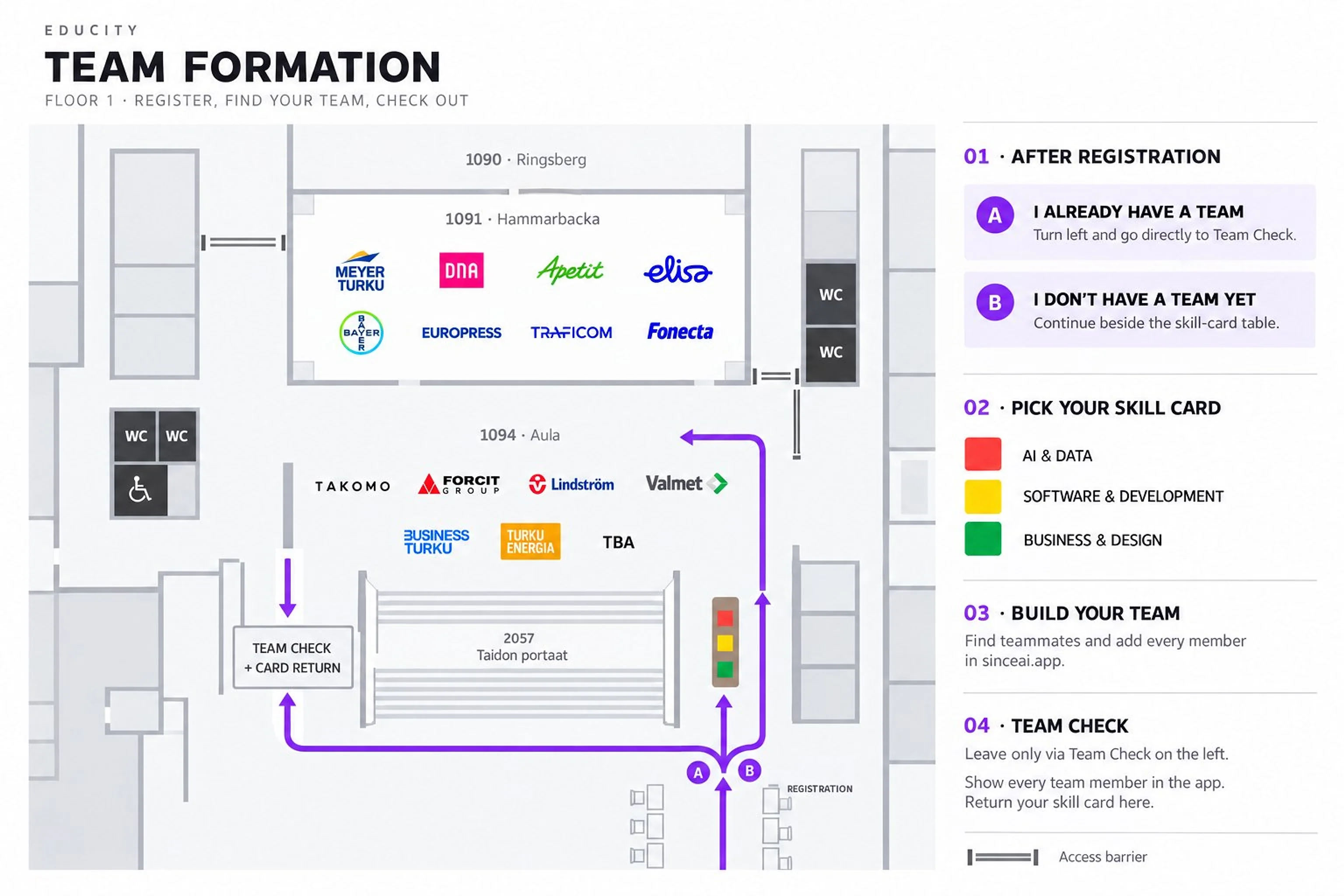
EduCity · Floor 1 · Team formation (Friday 15:00–16:45). Route A: you already have a team — straight to Team Check. Route B: no team yet — pick a skill card, meet people in the Aula, build your team in sinceai.app, then Team Check. The company logos are meeting-point posters, not briefing rooms. Source: Since AI event map.

Locations on this map

  • Registration — Check in here from Fri 15:00
  • A · I already have a team — Turn left and go directly to Team Check
  • B · I don't have a team yet — Continue beside the skill-card table into the Aula
  • Skill-card table — Red: AI & Data · Yellow: Software & Development · Green: Business & Design
  • 1094 Aula and 1091 Hammarbacka — Company challenge posters — meeting points for finding teammates, not briefing rooms
  • Team Check + card return — The only way out: show every team member in sinceai.app and return your skill card
  • 2057 Taidon portaat — Opening ceremony, Fri 17:00

Open the full-resolution image

This plan shows the team formation flow only — it is not the building’s emergency exit plan. In an emergency, follow the exit signs and staff instructions.

// friday · briefing rooms · educity floors 1–3

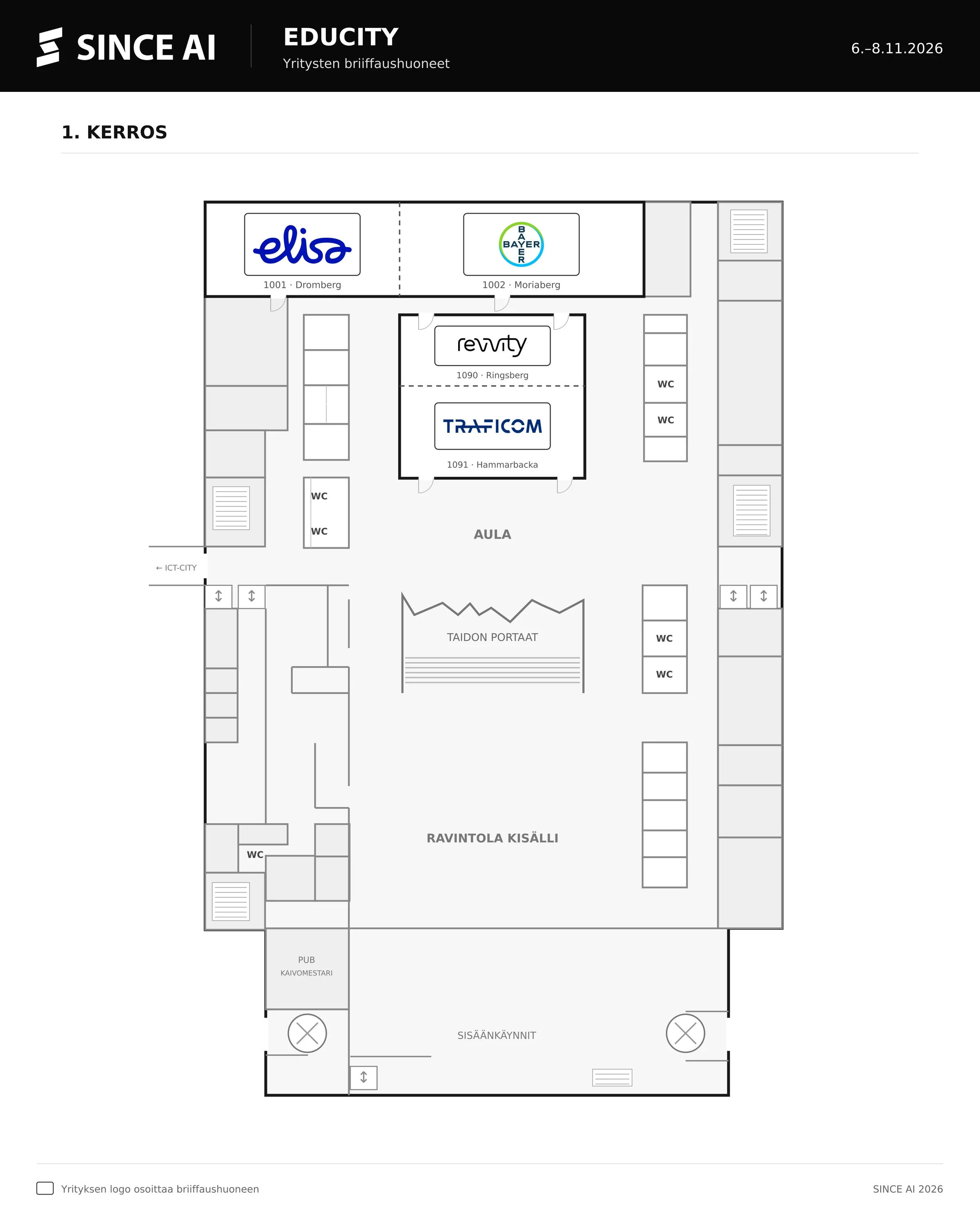
Your company's briefing room.

Your route in sinceai.app names your room from 17:30. Stay for the opening and Jason Mayes' programme; from 18:30 the teams leave in turn, at the departure time in their route, with volunteers showing the way. Briefings run 18:50–19:30.

EduCity · Floor 1 · Company briefing rooms. Company logos mark the briefing rooms used on Friday 18:50–19:30. Lifts on both sides of the lobby. Source: Since AI event map.

Locations on this map

  • 1001 Dromberg — Elisa
  • 1002 Moriaberg — Bayer
  • 1090 Ringsberg — Europress
  • 1091 Hammarbacka — Traficom
  • Taidon portaat — Opening ceremony, Fri 17:00 · stairs up to floor 2
  • Lifts — West and east of the lobby — up to floors 2 and 3
  • Main entrances — Both lead to registration
Finnish words on this map
Kerros
= Floor
Aula
= Lobby
Taidon portaat
= Large stair seating — opening ceremony
Ravintola
= Restaurant
Sisäänkäynti / sisäänkäynnit
= Entrance / entrances
Yritysten briiffaushuoneet
= Company briefing rooms
Yrityksen logo osoittaa…
= The company logo marks its room / stand
Hissi
= Lift

Open the full-resolution image

// schedule

Friday to Sunday.

Local Turku time (EET, UTC+2).

Add weekend scheduleOpening, workshops, deadlines and finals — all in one place.
  • Apple Calendar

    Subscribe in Apple Calendar

    iPhone, iPad and Mac. Stays up to date.

  • Google Calendar

    On a computer: Other calendars + → From URL, paste the link below. Or download the file and use Settings → Import & export.

  • Outlook

    Open the downloaded file in Outlook — or in Outlook on the web, Add calendar → Subscribe from web and paste the link below.

  • Other calendars

    Any app that opens .ics files.

Calendar link

https://sinceai.ai/hackathon-2026/guide/calendar/builders

Subscribing keeps the schedule up to date if it changes — your calendar app checks for changes itself, and Google can take a day. A downloaded file is a fixed copy.

Thursday 5 November

  1. 15:00

    Challenge summaries open in sinceai.app

    Public-safe summaries of all 15 company challenges open for registered participants — with or without a team. Choose from these summaries only: full templates and datasets go only to the teams that chose that company, after its briefing. Each company challenge awards its top three teams €2,000, €750 and €250 in cash — except FORCIT Group's Drill and Blast Cycle Intelligence: €3,000, €1,500 and €500, a €5,000 prize pot. Agree on at least three you would be happy with — places are limited.

    sinceai.app

Friday 6 November

  1. 15:00

    Registration opens

    Check in at EduCity — both main entrances lead to registration. Every team member must check in in person on Friday. Already have a team? Route A: go straight to Team Check on the left. No team yet? Route B: pick a skill card and find your team.

    EduCityMain entrances → registration

  2. 15:00 to 16:45

    Team formation

    Teams of up to five are formed in sinceai.app — every member must join the same team in the app. No team yet? Pick a skill card beside registration and meet people in the Aula and room 1091. Then leave via Team Check on the left: show every member in the app and return your skill card.

    EduCityFloor 1 · Aula and room 1091 beside Taidon portaat

    Note: Team formation closes at 16:45.

  3. 15:00 to 17:30

    Mark your team ready, then select

    From 15:00 the team lead marks the team as ready in sinceai.app — the roster is then fixed — and selects one of the 15 company challenges for the whole team. The choice is final and cannot be changed. Places are limited, first come first served. Each company challenge awards its top three teams €2,000, €750 and €250 in cash — except FORCIT Group's Drill and Blast Cycle Intelligence: €3,000, €1,500 and €500, a €5,000 prize pot.

    sinceai.app

    Note: Selection closes at 17:30.

  4. 16:45

    Team formation closesDeadline

    After 16:45 no new teams can be created, nobody can join a team and members cannot be changed. A team that is complete but not yet marked ready can still be marked ready and select its challenge until 17:30.

    sinceai.app

  5. 16:45 to 16:55

    Major League Hacking: Introduction & Hacker ResourcesTalk

    A ten-minute introduction from Major League Hacking (MLH): its tools, sponsor technologies, the MLH award categories and how builders can take part, on the Taidon portaat stage. The opening ceremony follows at 17:00.

    EduCityLobby · Taidon portaat

  6. 17:00 to 17:30

    Opening ceremonyCeremony

    The official start. The hosts welcome everyone and read out the introductions of the company challenges — at most a minute each. Challenge selection stays open in sinceai.app until 17:30 for teams their lead has marked ready.

    EduCityLobby · Taidon portaat

  7. 17:30 to 18:30

    Keynote and tech talk: Jason MayesTalk

    Jason Mayes, Google's Web AI Lead: a 30-minute keynote, then a 30-minute tech talk. Stay for both — your team moves to its briefing room after the programme, at the departure time in your route.

    EduCityLobby · Taidon portaat

  8. 17:30

    Challenge selection closes — your route is in the appDeadline

    At 17:30 no new selections are accepted and sinceai.app shows your team's route: the selected challenge, your departure time, the room and floor. The briefing rooms and maps are also in this guide. If your team has no challenge when selection closes, go straight to event staff — never guess a room.

    sinceai.app

  9. 18:30 to 18:50

    Move to your briefing room

    From 18:30, after Jason Mayes' programme, the teams move in turn to their challenge company's room at EduCity. Leave at the departure time in your team's route in sinceai.app and follow the volunteers.

    EduCityFloors 1–3

  10. 18:30 to 22:00

    DinnerMeal

    Buffet at Restaurant Mauno, BioCity, open the whole window — builders come over after their briefings; eat whenever suits you.

    BioCity

  11. 18:50 to 19:30

    Your challenge briefing

    Your challenge company presents the full task: expected result, boundaries, resources, evaluation and how to reach them during the event. It shares its own materials with its teams in its own way. Afterwards a volunteer walks you to BioCity.

    EduCityYour company's room

    Note: Every briefing ends at 19:30 at the latest.

  12. 19:30

    Full challenge in the app — move to BioCity and start building

    At 19:30 the full challenge view and materials open in sinceai.app for your team — only for the teams that chose that company. A volunteer walks your team to BioCity. Eat when it suits you — dinner runs until 22:00 — find a workspace in BioCity or Joki and start building as soon as you arrive. Build spaces stay open around the clock.

    BioCity + Joki

  13. 20:30 to 21:00

    GitHub Copilot WorkshopWorkshop

    Hosted by Major League Hacking (MLH). Learn how to activate and use GitHub Copilot in your hackathon project, including an introduction to MCPs. Bring your laptop. Beginners are welcome.

    BioCityPresidenttiauditorio

    Note: Limited seating — we recommend one person per team. You don't need to attend to use the tools.

    View room on map for GitHub Copilot Workshop

  14. 21:00 to 21:30

    Google AI Studio WorkshopWorkshop

    Hosted by Major League Hacking (MLH). Get started with Google AI Studio and Gemini. Learn how to create an API key, explore models and build AI features into your hackathon project. Bring your laptop. Beginners are welcome.

    BioCityPresidenttiauditorio

    Note: Limited seating — we recommend one person per team. You don't need to attend to use the tools.

    View room on map for Google AI Studio Workshop

  15. 22:00

    Building continues through the night

    Build spaces stay open. Short rest is fine in suitable event areas; there are no sleeping facilities.

    BioCity + Joki

Saturday 7 November

  1. Around 07:00

    BreakfastMeal

    Menu coming soon — the breakfast menu will be announced closer to the event.

    BioCity

  2. 09:00 to 12:00

    Challenge partner Q&A openCompany Q&A

    Find your company at Joki — Showroom (floor 1) or floors 2–3. Each company posts its representative hours at its stand. TrustED takes part remotely: its experts answer on Discord, not at a stand.

    Joki

  3. 10:30 to 13:30

    LunchMeal

    BioCity

  4. 12:00 to 12:30

    BearingPoint Workshop – From AI Prototype to Business ImpactWorkshop

    Hosted by BearingPoint. Learn how to turn an AI prototype into real business impact with BearingPoint. Discover practical ways to transform innovative ideas into valuable real-world solutions.

    BioCityPresidenttiauditorio

    View room on map for BearingPoint Workshop – From AI Prototype to Business Impact

  5. 12:00 to 14:30

    Q&A break

    The company Q&A stands at Joki pause. Keep building — the Q&A reopens at 14:30.

    Joki

  6. 14:30 to 18:00

    Challenge partner Q&A openCompany Q&A

    Second Q&A window at Joki.

    Joki

  7. 17:00 to 20:00

    DinnerMeal

    BioCity

  8. 20:00

    Final push — building continues through the night

    Build spaces stay open. Short rest is fine in suitable event areas; there are no sleeping facilities.

    BioCity + Joki

Sunday 8 November

  1. Around 07:00

    BreakfastMeal

    Menu coming soon — the breakfast menu will be announced closer to the event.

    BioCity

  2. 10:00

    Hard submission deadlineDeadline

    Your team submits its final solution in sinceai.app — any team member can submit. The deadline is fixed — submit early.

    sinceai.app

  3. 10:00 to 12:00

    Vote for the best solutions

    sinceai.app shows every eligible builder two solutions at a time — pick the stronger one. Every eligible builder is asked to complete 20 comparisons. The five highest-ranked projects from five different company challenges go through to the finals at 14:00 and compete for the overall win.

    sinceai.app

    Note: Voting rules are shown in the app.

  4. 10:00 to 13:00

    LunchMeal

    BioCity

  5. 12:00

    Voting closes — five finalists confirmed

    The votes are checked and the five finalists confirmed — the highest-ranked projects from five different company challenges. The finalist teams are told they are through and get their presentation instructions.

    sinceai.app

  6. 12:30

    Move to EduCity for the closing ceremony

    From 12:30 volunteers guide everyone from BioCity and Joki to Taidon portaat at EduCity — be there before the closing ceremony starts at 13:15.

    EduCityLobby · Taidon portaat

  7. 13:00

    Finalists: come to the side of the stage

    The five finalist teams come to the side of the stage at 13:00 to hear how the 14:00 presentations and the jury's questions work. Front-row seats are reserved for the finalists.

    EduCityLobby · Taidon portaat

  8. 13:15

    Closing ceremony beginsCeremony

    The hosts thank everyone, followed by a short motivational talk of at most ten minutes.

    EduCityLobby · Taidon portaat

  9. 13:30 to 14:00

    Company challenges: top three announced

    Each company's top three teams are announced and awarded on one slide, at most two minutes per company. If your team is among them, stay after the ceremony on EduCity floor 1 under Taidon portaat — the photographer and photo wall are ready there for your team photo.

    EduCity

  10. 14:00 to 15:10

    Finals: five finalist teams present liveCeremony

    If your team is a finalist, you present live on stage at EduCity — not a recorded video: at most four minutes, then up to six minutes of questions from the jury. The jury then selects the overall winner.

    EduCity

  11. Around 15:30

    Since AI Hackathon 2026 ends

    After the finals: the jury's decision, the overall winner's award and the closing words — the last thing on screen is the QR code to next year's hackathon. The event ends around 15:30.

    EduCity

// sinceai.app

The app runs your weekend.

Your team, your challenge and your submission all live in sinceai.app.

  1. From Thu 5 Nov 15:00

    Read the summaries

    Everyone

    Public-safe summaries of all 15 company challenges. Choose from these only — agree on at least three with your team.

  2. Before the event · by Fri 16:45

    Your team

    Everyone

    Create or join your team — up to five members. Every member must appear in the same team: that is what you show at Team Check. Team formation closes at 16:45.

  3. Fri 15:00–17:30

    Ready, then select

    Your team lead

    The lead confirms Mark team as ready — the roster is then fixed — and selects one company challenge for the whole team. Final; places are limited.

  4. From Fri 17:30

    Where to go

    Everyone

    The app shows your team's route: challenge, departure time, room and floor. The full challenge opens in the app at 19:30, for your team only.

  5. Before Sun 10:00

    Submission

    Any team member

    Submit your team's final solution and tick any MLH categories. A confidential challenge also needs a public-safe summary. The deadline is fixed — submit early, not at 09:59.

  6. Sun 10:00–12:00

    Voting

    Everyone

    Two solutions at a time — pick the stronger one. Complete all 20 comparisons. The five highest-ranked projects from five different company challenges.

// building & submissions

Build with AI. Submit in sinceai.app.

What you can use, what you stay responsible for, and exactly how your team submits by Sunday 8 November, 10:00 EET.

AI tools · permitted and encouraged

Build with AI. We encourage it.

Use the best tools available to turn real problems into working solutions — and be ready to explain, demonstrate and stand behind what you build.

  • ChatGPT
  • Claude and Claude Code
  • Google Gemini
  • GitHub Copilot
  • Cursor
  • Lovable
  • OpenCode

…or any other AI assistant, coding agent, model, framework or developer platform.

AI is a choice, not a requirement — you don't need a paid subscription to compete.

Your team stays responsible

  • Understand your solution and verify generated code — you are responsible for its security, reliability and behaviour.
  • Be ready to explain your engineering decisions.
  • Disclose the main AI tools you used — the submission form asks. No need to label AI-written lines.
  • Separate pre-existing code and assets from what you built at the event.
  • Licences, the challenge's rules and its data restrictions still apply.

Partner tools and benefits: computing, AI models, app builders and developer tools from our technology partners, with quickstarts and where to get help, in AI Tools & Resources.

How to submit your project

Official platform

sinceai.app

The official submission platform is sinceai.app, not Devpost. An entry on Devpost alone is not a submission.

Deadline · fixed

On your sinceai.app dashboard, the event card shows Submit project while submissions are open (Edit submission once you have submitted).

Required

  • ChallengeYour team's Friday selection, filled in for you; only the organisers can change it.
  • Project nameUp to 80 characters.
  • TaglineOne sentence on what your project does, up to 140 characters. Voters read it first on every vote card.
  • About the projectThe problem, your solution, how you built it, what you met on the way and what comes next — up to 5,000 characters. Judges read all of it; voters see the first lines.
  • Built withTechnologies you used, comma-separated. The first five appear as chips on your vote card.
  • RepositoryA link to your code, public or private. If it is private, judges use your source-code .zip.
  • Demo videoA public or unlisted YouTube link, ideally under two minutes. YouTube is the only accepted format — no video file uploads.
  • Source codeOne .zip of your code as it stands at the deadline, up to 100 MB.
  • MLH questionsTechnology feedback, the GenAI tools you used (or “I did not use GenAI”) and whether you implemented a generative AI model or API.
  • Challenge termsAccepted by submitting. On a challenge that transfers ownership, every team member ticks them personally first.
  • Public summary (confidential challenges only)A public-safe summary, and your confirmation that the project name, tagline, summary and Built with contain no confidential data.What is confidential

Optional

  • Demo URLA link where your project can be tried, if it is deployed. Judges see it; voters don't.
  • Pitch deckOne PDF or PowerPoint. Voters can open it from your vote card.
  • Supporting documentsUp to two, for the judges.
  • Partner technologiesTick the partner technologies you used and say how in a sentence or two. Ticking Red Hat OpenShift AI or FIWARE also enters that award, with the evidence it asks for.Optional awards
  • MLH prize categoriesTick the MLH categories that fit — zero, one or several.Optional awards
  • Domain name and schools of team membersOptional MLH questions.
  • Gemini API project numberLeave it blank unless a prize category you enter asks for it.

Files

Source codeRequired
ZIP
One file, up to 100 MB. Leave out dependencies such as node_modules, and data files.
Pitch deckOptional
PDF, PPT, PPTX
One file.
Supporting documentsOptional
PDF, PPT, PPTX, DOC, DOCX, TXT, Markdown
Up to two.
Demo videoRequired
YouTube link
Public or unlisted. No MP4 or WebM uploads.

Files can be added before your first submit and are saved with it. The upload form shows the other size limits.

What voters see

One vote card, the same for every challenge, top to bottom:

  1. 1 ProjectChallenge, project name and team.
  2. 2 TaglineYour one sentence, in full.
  3. 3 DescriptionThe first few lines of About the project, with Read more.
  4. 4 Demo videoYour YouTube video, playable on the card. Voters can vote without watching to the end.
  5. 5 Pitch deckWhen you added one.
  6. 6 Built withThe first five technologies, as small chips.
  • Never on the card: your repository, your demo URL or other links. Voters compare about 20 pairs quickly and don't clone or deploy anything; judges and organisers still see your links.
  • Confidential (NDA) challenges get the same card, with only what your team confirmed public-safe: the project name, tagline, public summary and Built with — and the video and deck unless the company has turned them off. Until you confirm, voters see a neutral placeholder. The card shows no confidentiality label.
  1. Step 1

    Prepare the details

    Write the tagline and description, list your Built with and keep your repository up to date while you build — not at 09:50 on Sunday.

  2. Step 2

    Upload your demo video to YouTube

    Record a short demo, ideally under two minutes, and upload it as public or unlisted. Open the link logged out to check it plays.

  3. Step 3

    Zip your source code

    One .zip, up to 100 MB, without node_modules or data files. Judges use it if your repository or demo can't be opened.

  4. Step 4

    Fill in the form and add files

    Any team member submits — one entry per team. Add the zip, and a pitch deck if you have one, in the same go.

  5. Step 5

    Everyone accepts the terms

    On a challenge that transfers ownership, each team member ticks the challenge terms for their own work — do it as soon as your team has its challenge.

  6. Step 6

    Check before 10:00

    Review the entry, the video and every file. You can edit until submissions close.

Optional awards: on the same submission, tick MLH categories, and tick Red Hat OpenShift AI or FIWARE under Partner technologies to enter those awards — how to enter the optional awards.

What makes a strong entry

  • A working prototype — the product is the pitch.
  • A tagline a voter understands in five seconds.
  • A demo video that shows it working in the first 20 seconds, under two minutes in all.
  • A repository with a README and setup instructions.
  • A concise deck only if it helps; it never replaces a working prototype.
Open your sinceai.app dashboard (opens in a new tab)

Building & submitting: questions

Can we use ChatGPT, Claude, Cursor, GitHub Copilot, Gemini, Lovable and other AI tools?

Yes — absolutely. AI-assisted development is permitted and encouraged. Use the best tools available to turn real problems into working solutions — and be ready to explain, demonstrate and stand behind what you build.

  • For example: ChatGPT, Claude and Claude Code, Google Gemini, GitHub Copilot, Cursor, Lovable, OpenCode …or any other AI assistant, coding agent, model, framework or developer platform.
  • Use it for anything: ideation, research, architecture, code, debugging, data analysis, testing, UI/UX, documentation, prototyping, model training and inference, deployment — all of it.
  • AI is a choice, not a requirement — you don't need a paid subscription to compete.
Will using AI-generated code hurt our judging score?

No. Using AI — even for most of your code — does not count against you. AI is a tool, not a shortcut around responsibility: we care about the problem you solve, the value you create, the working product you demonstrate and your ability to explain the decisions behind it. AI never excuses code that doesn't work or data you weren't allowed to use.

  • Evaluators look at what your team built during the event, whether it works and whether it answers the challenge.
  • They also weigh real-world relevance and business value, technical quality, feasibility, how well you understand and explain your system, and responsible handling of privacy, security and data.
  • Each challenge company evaluates its own challenge with its own criteria and picks its top three. The five highest-ranked projects in the participant vote from five different company challenges present in the finals, where the jury selects the overall winner.
What should we disclose about AI and third-party technology?

The submission form asks for your main AI tools and how you used generative AI — that is the required part. We also recommend a short technology inventory in your README; a concise list is enough, not a full software bill of materials.

  • AI development tools, models and APIs you used
  • Frameworks and libraries, with their licences where it matters
  • Third-party datasets and significant external services
  • Pre-existing code and assets — kept apart from what you built at the event
  • Material security and privacy considerations
Can we use our own GitHub repositories and let AI coding agents modify the code?

Yes. Work in your own repositories — private ones too, where that suits you — and let AI assistants and agents read and change your project files, as long as you have the rights to do so. No VPN or virtual machine is required; if a challenge sets rules for its environment or data, follow them.

  • Commit often with meaningful messages; keep a README with reproducible setup steps.
  • Keep secrets in environment variables or a secrets manager — never in a commit.
  • Give tools and agents the least access they need, and review the changes an agent makes.
  • Test before you deploy.
  • Don't send personal or confidential data to an external AI provider without permission.
  • Respect open-source licences and their attribution requirements.
  • Don't misuse the venue networks or run unauthorised security tests.
Who owns what we build? What are the challenge IP terms?

It depends on the challenge. Some challenges transfer the new work made for them to the challenge company; others let you keep ownership and grant the company a licence. The submission page shows the terms for your challenge, and every team member must read and accept them personally before your team can submit. Your pre-existing work and general know-how are not transferred, and open-source material stays under its own licence.

  • Never publish confidential agreements, private datasets, partner credentials or protected challenge material.
  • A public repository is fine only where your challenge's terms allow it.
Where do we submit? Do we need Devpost?

The official submission platform is sinceai.app, not Devpost. An entry on Devpost alone is not a submission. Submit in sinceai.app by Sunday 8 November, 10:00 EET. On your sinceai.app dashboard, the event card shows Submit project while submissions are open (Edit submission once you have submitted).

Open your sinceai.app dashboard (opens in a new tab)

Is a demo video or a pitch deck required? Which files can we upload?

A demo video is required: a public or unlisted YouTube link, ideally under two minutes. YouTube is the only format — MP4 or WebM files can't be uploaded. Your source code is required too, as one .zip of up to 100 MB without node_modules or data files. A pitch deck (one PDF, PPT or PPTX) and up to two supporting documents (PDF, PPT, PPTX, DOC, DOCX, TXT or Markdown) are optional. Files can be added before your first submit. On a confidential challenge the video is required unless the company or the organisers make it optional — the form tells you.

What voters see

Who submits for the team?

Any member of the team can submit the team's solution in sinceai.app — agree who does it. There is one entry per team, and it goes through once every member has accepted the challenge IP terms. The deadline, Sunday 8 November, 10:00 EET, is fixed.

What should my team complete before arriving?

Three separate things must be true for each member: they are accepted to the hackathon, they are an accepted member of your team in sinceai.app, and they check in personally on site on Friday. Then work through the checklist under Bring and do.

Bring and do

// where

Start at EduCity. Build at BioCity and Joki.

After your briefing, move with your team to BioCity or Joki and pick a workspace — both are open around the clock. Sunday's closing is back at EduCity.

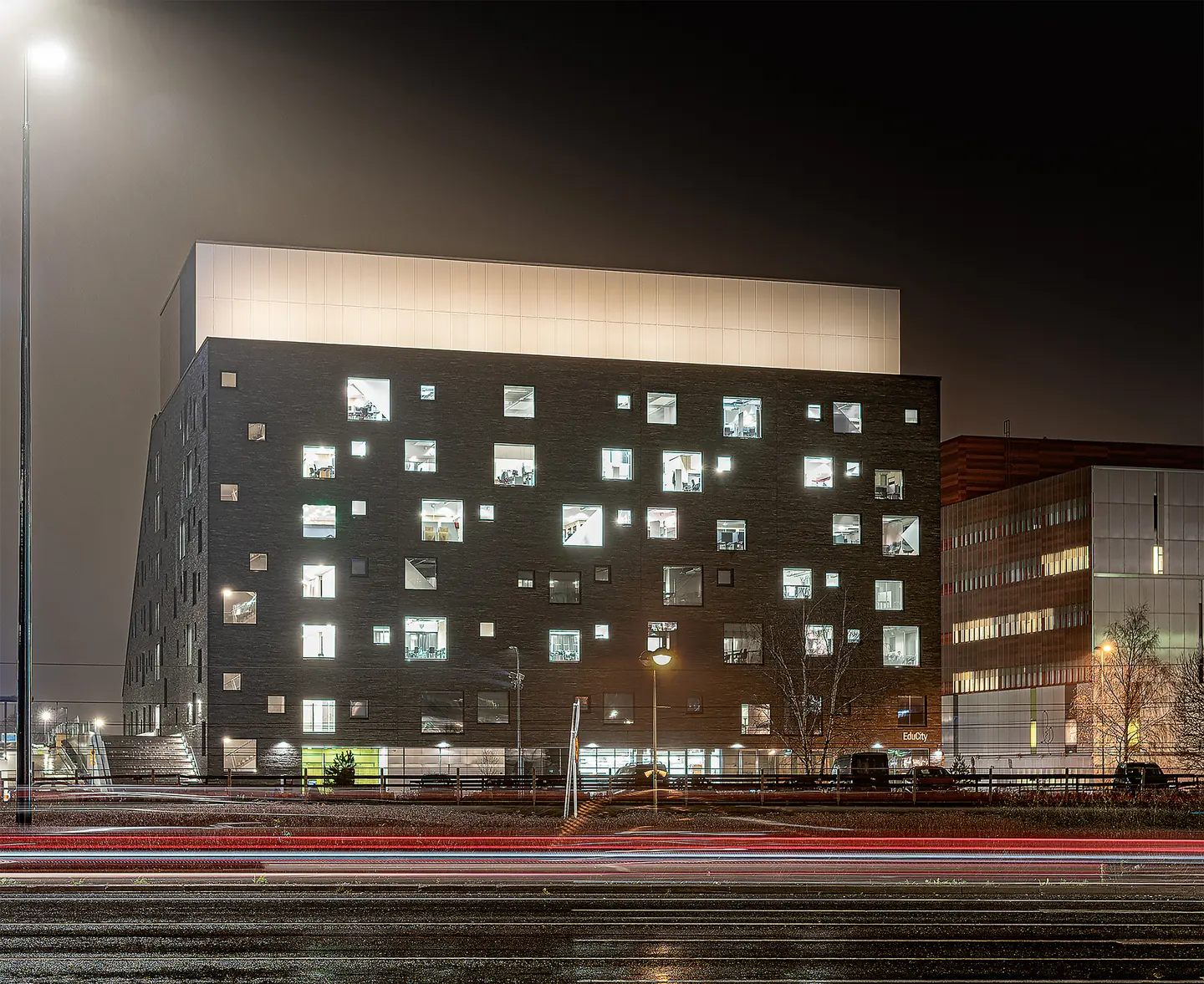
  • EduCity in Turku at night

    EduCity

    EduCity (Turku AMK Kupittaa campus)

    Joukahaisenkatu 7, 20520 Turku
    • Arrival, registration and team formation (Fri from 15:00)
    • Opening ceremony (Fri 17:00)
    • Company challenge briefings (Fri 18:50–19:30)
    • The closing ceremony (Sun 13:15), each challenge's top three (13:30) and the finals (Sun 14:00)

    Main entrances: Both main entrances (west and east) are in the glass entrance pavilion at deck level and lead to registration. From Joukahaisenkatu, take the wide outdoor stairs at the east corner — or the step-free lifts in the passage between ICT-City and EduCity.Current plan

  • BioCity at dusk: a large glass and dark-panelled office building on a street corner, seen from the Tykistökatu–Lemminkäisenkatu junction.
    Photo: Turun Teknologiakiinteistöt Oy

    BioCity

    Tykistökatu 6, 20520 Turku
    • Build space in the main lobby (around the clock)
    • Meals
    • Visibility & tech partner stands

    Company entrance: Tykistökatu 6 — the main entrance in the open recess next to the glass corner tower (level access). Companies and partners come in here.Current plan

    Event entrance: Builders: the courtyard-side entrance from Jussin aukio, into the Aulagalleria.Current plan

    To Joki: Indoors from the far (south-east) end of the main lobby, down a short stair (10 steps).

    Open around the clock

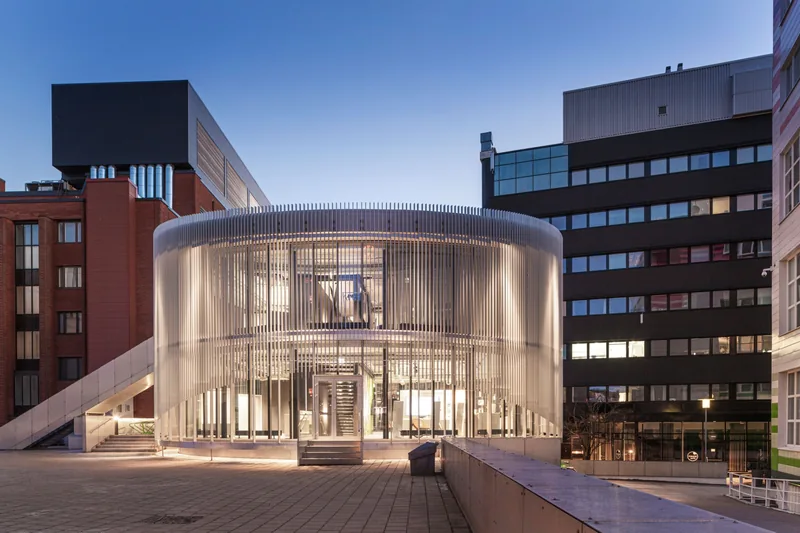
  • Joki's round glass tower lit up at dusk on the campus courtyard.
    Photo: Turun Teknologiakiinteistöt Oy

    Joki

    Visitor and Innovation Centre Joki

    Lemminkäisenkatu 12b, 20520 Turku
    • Build space in the Aula and the Cave hall (around the clock)
    • Challenge partner Q&A — Showroom and floors 2–3
    • Company Lounge (floor 1)

    From BioCity: The event way in: from the far (south-east) end of BioCity's main lobby, down a short stair (10 steps) — follow the event signs.

    Street door: Lemminkäisenkatu 12b is closed during the event — enter Joki through BioCity.Current plan

    Step-free access: The way in from BioCity has 10 steps. If you need step-free access to Joki, email info@sinceai.fi before the event so the organisers can arrange a step-free way in.Current plan

    Open around the clock

Coming by car? Park in ParkCity (Joukahaisenkatu 8), across the street from EduCity, or at P-Station Kupittaa, open 24/7. Both are paid. Prices, hours and directions.

EduCity → BioCity & Joki

Current plan

A 3-minute outdoor walk along the raised campus deck to Jussin aukio.

about 200 m outdoors · 3 min

  1. Leave EduCity by the west main entrance — after Friday's briefings, volunteers and event signs show the way.
  2. Follow the raised deck past ICT-City to Jussin aukio and take the wide outdoor stairs down (about 10 steps).
  3. Enter BioCity through its courtyard-side event entrance.
  4. Joki is indoors from BioCity: at the far (south-east) end of the main lobby, down a short stair (10 steps).
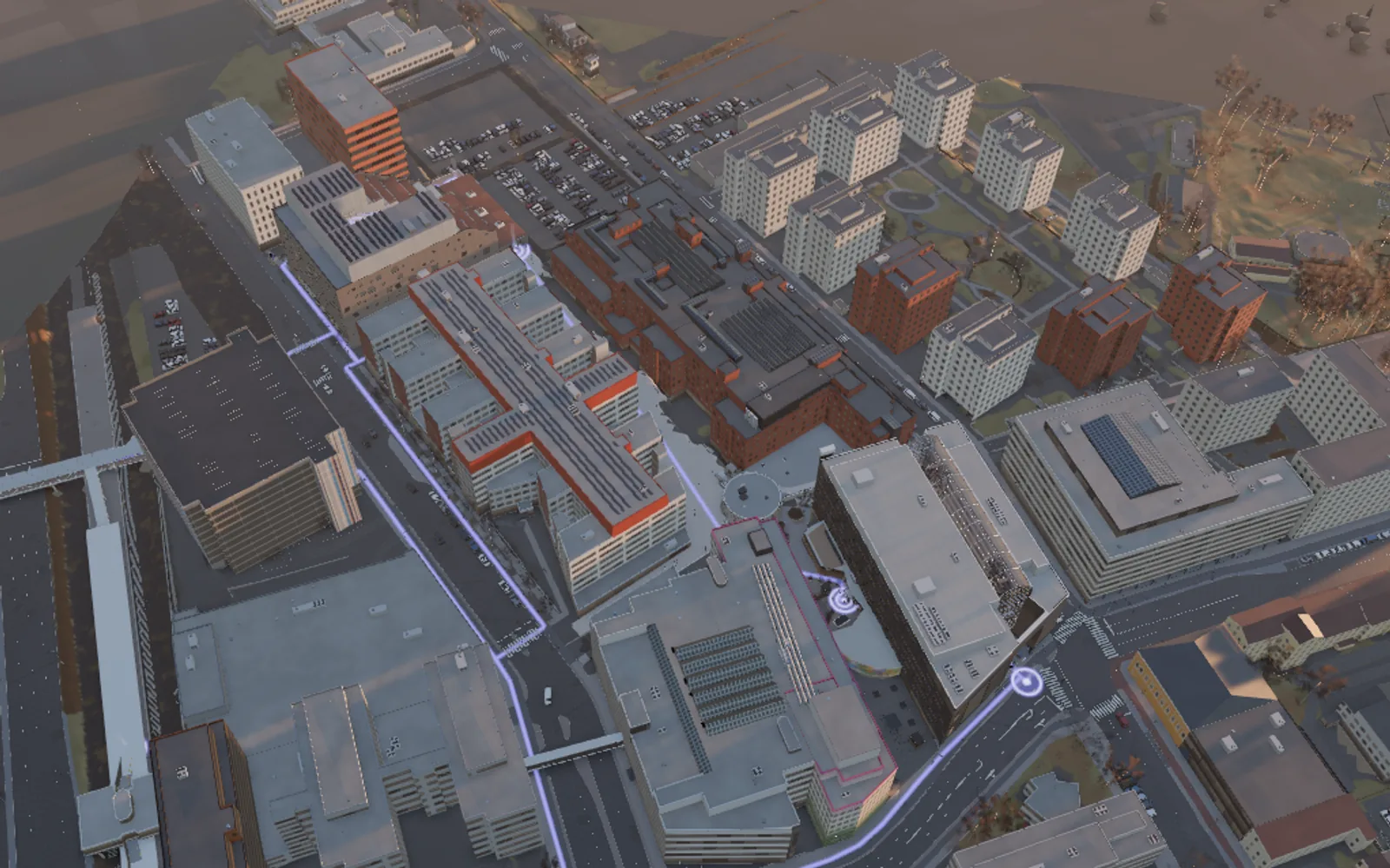
Schematic overview of the event venuesSeen from the north-east. EduCity on the left. About 200 m along the raised campus deck (3 min) leads to BioCity's courtyard-side event entrance on the right. Joki is joined to BioCity; its round tower (the Q&A floors) stands on the courtyard. Schematic, not to scale.BioCityJokiEduCityCourtyardEvent entranceSCHEMATIC · NOT TO SCALE

EduCity — arrival, opening, briefings, Sunday winners and finals

BioCity — build hall, meals, partner stands

Joki — build areas, Q&A tower, Company Lounge

Schematic, not to scale. Doors are signposted on the day — follow volunteers and event signs.

// wi-fi

Wi-Fi & Internet

Free Wi-Fi is available for hackathon participants at the event venues.

The main build spaces

BioCity & Visitor Center Joki

Network

Hackathon

Password

Weekend45

Case-sensitive: capital W. The same network and password in both buildings.

Network capacity is shared, so download what you need before you arrive.

Friday opening and Sunday finals

EduCity

Network

TUAS Guest

  1. 1Open your device's Wi-Fi settings.
  2. 2Select TUAS Guest.
  3. 3Open your browser to reach the registration portal.
  4. 4Enter a valid email address, accept the network's acceptable use policy and connect.

eduroam. Already use eduroam through your university or research institution? Connect with your existing institutional credentials.

Before you arrive

  • Download your programming tools, dependencies, container images and AI models in advance.
  • Bring your laptop, charger and any adapters you need.
  • A personal mobile hotspot is a useful backup, if you have one.
  • Network capacity is shared — avoid large downloads at peak times.
  • Do not scan, attack or run unauthorised security tests on the venue networks.

Connection problems?

If you experience connectivity issues, please contact our on-site support team.

Official informationTurku UAS visitor Wi-Fi (opens in a new tab)eduroam setup (opens in a new tab)

// stay

Accommodation & discounted rates.

Accommodation is not included in hackathon participation unless Since AI has confirmed it to you personally. We have arranged discounted rates in Turku for Since AI participants — availability is limited, so book early.

// checklist

Bring and do.

Before you arrive
Bring
On the day

Ticks are saved on this device only.

Optional: AI computing. CSC / LUMI AI Factory resources — who can register, the Friday 30 October 2026 deadline and where your instructions are: AI resources in the Field Guide.

// maps

Find your way.

EduCity for Friday, then the build spaces. Tap a map to zoom.

EduCity · Floor 1 · Team formation (Friday 15:00–16:45). Route A: you already have a team — straight to Team Check. Route B: no team yet — pick a skill card, meet people in the Aula, build your team in sinceai.app, then Team Check. The company logos are meeting-point posters, not briefing rooms. Source: Since AI event map.

Locations on this map

  • Registration — Check in here from Fri 15:00
  • A · I already have a team — Turn left and go directly to Team Check
  • B · I don't have a team yet — Continue beside the skill-card table into the Aula
  • Skill-card table — Red: AI & Data · Yellow: Software & Development · Green: Business & Design
  • 1094 Aula and 1091 Hammarbacka — Company challenge posters — meeting points for finding teammates, not briefing rooms
  • Team Check + card return — The only way out: show every team member in sinceai.app and return your skill card
  • 2057 Taidon portaat — Opening ceremony, Fri 17:00

Open the full-resolution image

// details & edge cases

Good to know.

Can I take part alone?

Yes — solo participation is allowed. You can still look for teammates on Discord and at Friday's team formation area. A one-person team needs a quick check by the tech team at registration.

What if a team member cannot check in on Friday?

Friday check-in is the rule: every team member checks in in person at EduCity on Friday to take part and to share in any prize. If the organisers approved your Saturday arrival in advance, you keep your team membership: you must already be in the right team in sinceai.app before team formation closes at 16:45 on Friday, and you check in with event staff personally when you arrive on Saturday. Without a check-in or an approval given in advance, a member may be removed from the team overnight by the organisers. Need an exception? Ask at info@sinceai.fi before the event — do not assume one.

  • The member must already be in your team in sinceai.app before your team lead marks it as ready, and before 16:45 on Friday — after that, nobody can be added or swapped.
  • Checking in is individual: browsing the app from elsewhere is not checking in.
  • Removing a member who did not check in is an organiser action. It never reopens the team or changes your challenge.
  • Since AI Hackathon is an on-site event; there is no remote participation.
How does team formation work?

Best: build your team in sinceai.app before the event. On Friday, after registration on EduCity's first floor, there are two routes. Route A — you already have a team: turn left and go straight to Team Check, and show on your phone that you are in your team. Route B — no team yet: pick a skill card at the table beside registration (red: AI & Data, yellow: Software & Development, green: Business & Design), meet people in the Aula and room 1091 — the company posters there are meeting points, not briefing rooms — and build your team in sinceai.app, up to five members. Then leave only via Team Check on the left: show every member in the app and return your skill card. Team formation closes at 16:45.

How does challenge selection work?

Each company challenge awards its top three teams €2,000, €750 and €250 in cash — except FORCIT Group's Drill and Blast Cycle Intelligence: €3,000, €1,500 and €500, a €5,000 prize pot. Every team must choose exactly one of the 15 company challenges. Public-safe summaries open in sinceai.app on Thursday 5 November at 15:00 — choose from these only, and agree on at least three you would be happy with. On Friday from 15:00, your team lead checks the member list and confirms Mark team as ready; the roster is then fixed. Straight after, the lead selects your company challenge. The choice is final — it cannot be changed or cancelled — and places are limited, first come first served. Team formation closes at 16:45 and selection at 17:30.

  • Only the team lead of a ready team can select; other members see the choice in the app.
  • At 17:30 the app shows your team's route: challenge, departure time, room and floor. The briefing rooms are also in this guide.
  • Your company presents the full challenge in its briefing, 18:50–19:30, and the full challenge view opens in the app at 19:30 — only for the teams that chose it.
  • No challenge when selection closes? Go straight to event staff — never guess a room.
  • Optional awards (MLH, Red Hat and FIWARE) are extra: they never replace your company challenge or use its places.
Can I bring my own food? Will food and drinks be provided?

Yes, bring your own snacks and food — keep the spaces clean and handle food safely. The scheduled event meals at Restaurant Mauno, BioCity, are free: confirm which ones you will join in the Meal RSVP on your sinceai.app dashboard by Friday 30 October 2026, with any dietary needs, so a meal is reserved for you. Each meal includes a warm main course, bread and spread, and water. The restaurant sells sandwiches, pastries, coffee, soft drinks, energy drinks and snacks separately.

  • The build spaces are open around the clock; food service is not. Bring a reusable water bottle and some snacks for the night.
  • Pre-arranged special meals are collected from Restaurant Mauno's open kitchen. With food allergies, always ask the restaurant staff before eating.
  • Any extra snacks or drinks from partners are a bonus — don't count on them overnight.

Meal times and menu

Is there Wi-Fi? Can we use Linux?

Yes — free Wi-Fi is available at the event venues: the Hackathon network at BioCity and Joki (password Weekend45), and TUAS Guest or eduroam at EduCity. The details are under Wi-Fi on this page. Bring any laptop: Linux, Windows and macOS all work, and no brand or operating system is required.

Wi-Fi instructions

Can we use CSC / LUMI computing?

Optionally, yes. Eligible participants can request access to the LUMI supercomputer and the Aitta inference service. Registration closes on Friday 30 October 2026 and needs approval in advance; activation can take several days. Access is limited to participants affiliated with organisations in EU Member States or Horizon Europe-associated countries, and a new CSC account needs an individual institutional email address. The registration instructions were sent to you privately by email.

AI resources in the Field GuideLUMI AI Factory onboarding guide (opens in a new tab)

What happens at the finals?

The five finalist teams — the five highest-ranked projects in the participant vote from five different company challenges — come to the side of the stage at 13:00 on Sunday, and from 14:00 they present live on stage at EduCity, not as recorded videos: at most four minutes each, then up to six minutes of questions from the jury. The jury selects the overall winner, and the event ends around 15:30.

Can we win anything besides our company challenge?

Yes — optional awards, entered on your submission in sinceai.app with the same project: eight MLH categories, and the Red Hat OpenShift AI Technology Award and FIWARE Open Innovation Award by ticking Red Hat OpenShift AI or FIWARE under Partner technologies. A separate FIWARE prototype is its own entry on the open challenges page. They never replace your company challenge or use its places.

Optional awards in AI Tools & ResourcesMLH prize categoriesMLH prize page (opens in a new tab)

Our challenge requires an NDA. What changes?

FORCIT Group's challenge requires FORCIT's paper NDA, signed with a FORCIT representative during its challenge briefing on Friday, before any access to the data — every member who receives the data signs. Only after FORCIT has accepted the NDA does it give personal credentials for FORCIT's own API: never share them, and never put them in code, a repository or Discord. Keep restricted data out of public repositories, videos and award evidence, and confirm a public-safe summary on your submission: voters see the same card as for any project, with only what you confirmed public-safe.

Confidential challenges

Can we sleep at the venue?

The build spaces stay open around the clock and you can leave and come back. There are no beds, sleeping rooms or lodging; a short rest is fine in suitable event areas. Accommodation is your own choice and cost.

What does it cost?

Participation is free, and so are the event meals — confirm yours in the Meal RSVP on your sinceai.app dashboard.

Under 18?

Contact info@sinceai.fi before the event.

// help

Stuck? Ask.